# OAuth2.0认证接入说明
# 开发者接入流程图

# 详细接入步骤
# 步骤一:创建应用
在开放平台管理后台 (opens new window) >>系统管理>>应用管理下创建应用,并申请获取用户信息的API接口访问权限
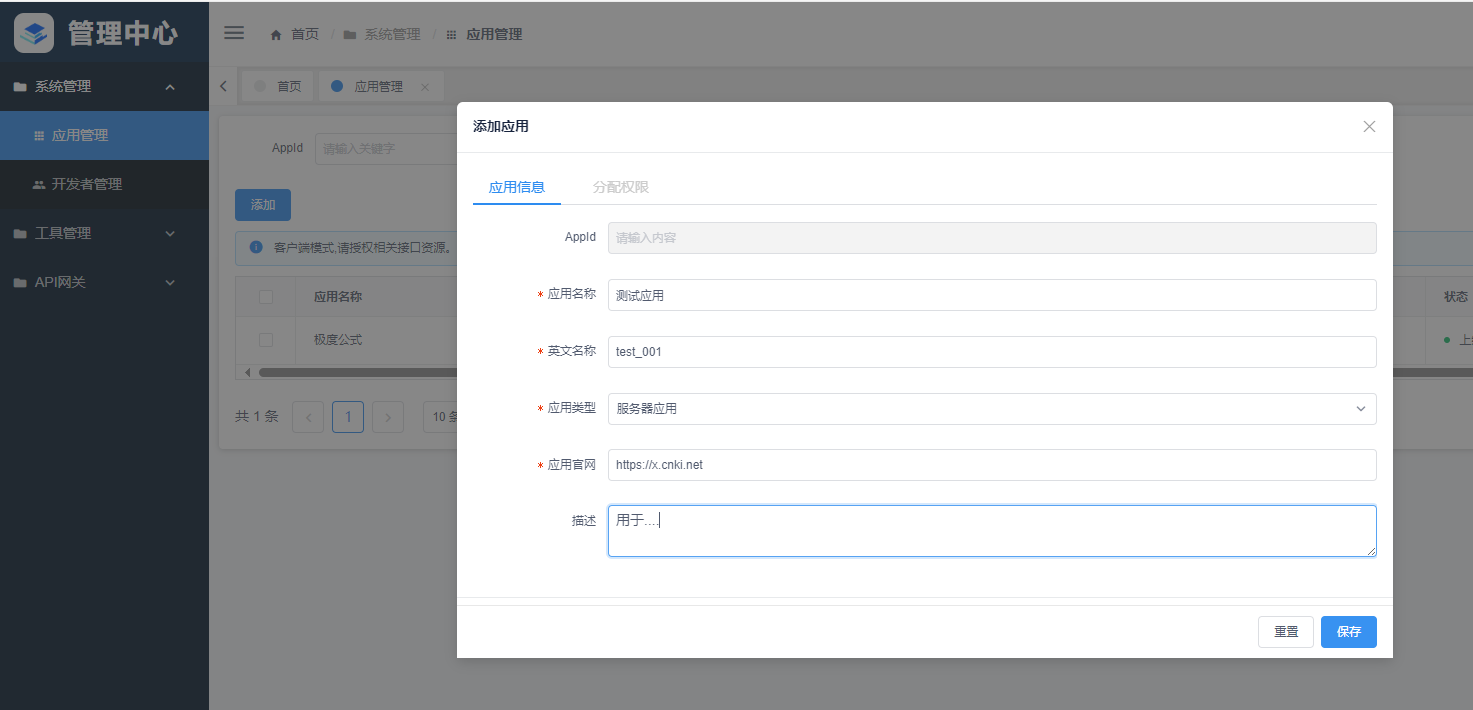
点击保存,之后再次点击编辑,申请接口访问权限
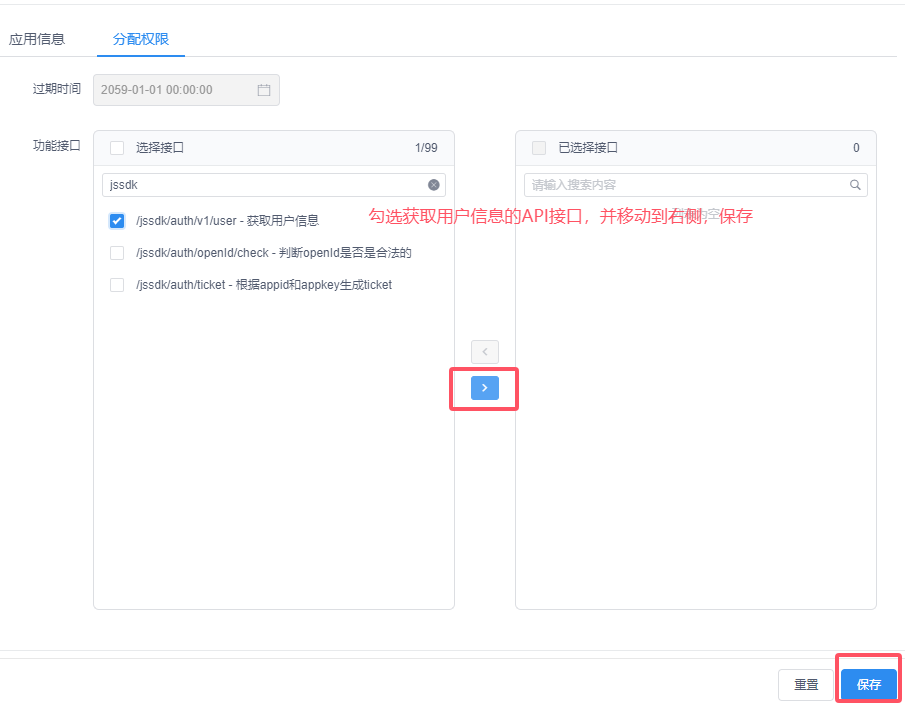
保存后等待审核即可。
# 步骤二:创建工具,填写授权回调地址
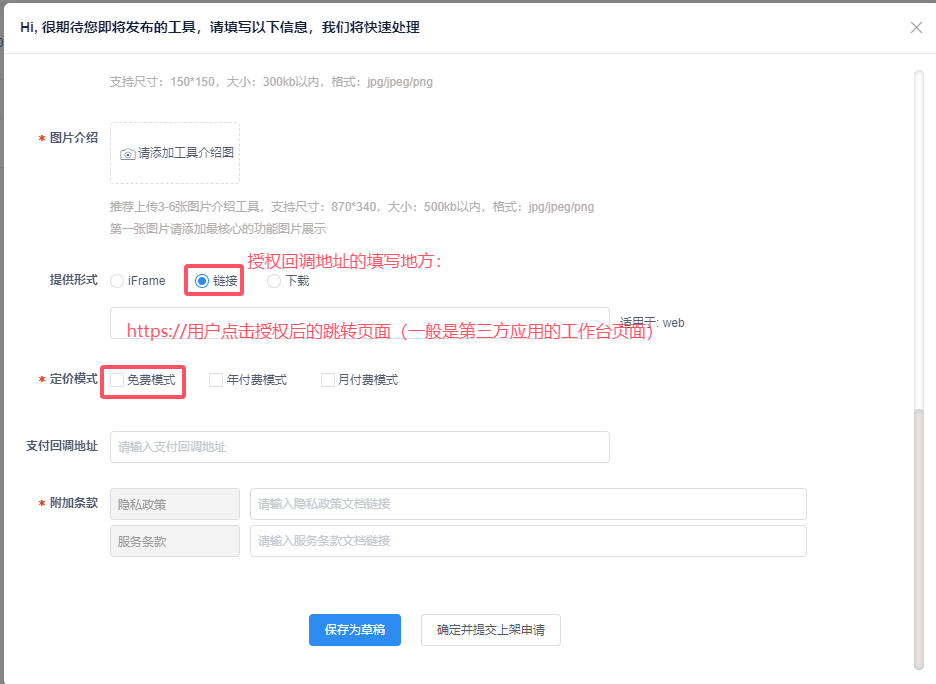
在开放平台管理后台 (opens new window) >>工具管理下创建工具,填写工具信息,注意授权回调地址需要点击链接才能填写。
# 步骤三:根据授权码获取access_token
用户在知网研学的应用中心点击第三方应用时会跳转到研学认证中心的授权页面,用户点击授权,认证中心会携带授权码openx_code以url参数的形式传递给第三方应用。

根据授权码获取Token的接口详情参见:授权码模式获取Jwt | 知网研学开放平台文档 (cnki.net) (opens new window)
注意事项:
授权码的有效期是2分钟,使用后失效;
access_token的有效期是2小时;为了安全性和合法性,请开发者在后端实现获取Token相关逻辑;
auth_mac参数是研学开放平台认证中心用于校验客户端身份的参数,生成方式:使用加密函数对授权码openx_code和应用标识app_id进行加密,拼接方式为:app_id=174****71581&openx_code=c10580cfd1505****9a3828ddcbb841037dc8a09,注意字段顺序。加密秘钥是从开放平台管理后台创建应用后生成的ApiKey。加密的示例代码如下:/** * 加密Map * * @param data 要加密的数据 * @return 加密后的字符串 * @throws Exception */ public static String encryptMap(Map<String, String> data, String secretKey) throws Exception { // 元素排序 Map<String, String> sortedData = new TreeMap<>(data); StringBuilder dataToEncrypt = new StringBuilder(); for (Map.Entry<String, String> entry : sortedData.entrySet()) { dataToEncrypt.append(entry.getKey()).append("=").append(entry.getValue()).append("&"); } // 去掉最后一个多余的& if (dataToEncrypt.length() > 0) { dataToEncrypt.setLength(dataToEncrypt.length() - 1); } SecretKeySpec secretKeySpec = new SecretKeySpec(secretKey.getBytes(StandardCharsets.UTF_8), "AES"); Cipher cipher = Cipher.getInstance("AES/ECB/PKCS5Padding"); cipher.init(Cipher.ENCRYPT_MODE, secretKeySpec); byte[] encryptedBytes = cipher.doFinal(dataToEncrypt.toString().getBytes(StandardCharsets.UTF_8)); return Base64.getEncoder().encodeToString(encryptedBytes); } /** * 解密Map * * @param encryptedData 加密后的字符串 * @return 解密后的Map * @throws Exception */ public static Map<String, String> decrypt(String encryptedData, String secretKey) throws Exception { Cipher cipher = Cipher.getInstance("AES/ECB/PKCS5Padding"); SecretKeySpec secretKeySpec = new SecretKeySpec(secretKey.getBytes(StandardCharsets.UTF_8), "AES"); cipher.init(Cipher.DECRYPT_MODE, secretKeySpec); byte[] decodedBytes = Base64.getDecoder().decode(encryptedData); byte[] decryptedBytes = cipher.doFinal(decodedBytes); String decryptedString = new String(decryptedBytes, StandardCharsets.UTF_8); Map<String, String> decryptedMap = new TreeMap<>(); String[] pairs = decryptedString.split("&"); for (String pair : pairs) { int idx = pair.indexOf("="); if (idx > 0) { decryptedMap.put(pair.substring(0, idx), pair.substring(idx + 1)); } } return decryptedMap; } public static void main(String[] args) { Map<String, String> data = new HashMap<>(); //授权码 data.put("openx_code", "396256a6c49d16a6de261a059972a8362671347f"); //应用Id data.put("app_id", "174*****1581"); try { String encrypt = encryptMap(data, "Nmq******H0Rp"); System.out.println("加密结果:" + encrypt); } catch (Exception e) { throw new RuntimeException(e); } }加密算法:
AES工作模式:
ECB填充方式:
PKCS5Padding以上是Java语言实现的加密算法,其它语言加密请保证相同的算法、工作模式、填充方式。
注意编码格式为:
UTF_8。请妥善保存应用秘钥
ApiKey!
# 步骤四:根据access_token获取用户信息
开发者后端在获取到access_token后,根据token调用获取用户信息API接口,获取用户的openId、用户名等信息。
根据access_token获取用户信息的接口详情参见:根据token获取用户信息 | 知网研学开放平台文档 (cnki.net) (opens new window)